How to run fast LLM / VLM inference on the NPU of Qualcomm SoCs using the QNN backend of ailia LLM.
ailia LLM 1.5.0 and later support fast inference on the NPU (Hexagon) of Qualcomm SoCs. For the NPU, ailia LLM uses a proprietary implementation developed by ailia Inc. that is separate from llama.cpp.
Using the NPU runs an LLM quickly and with low power consumption. In addition to text LLMs and VLMs (Vision Language Models) that take images as input, ailia LLM also supports audio input, with processing on the NPU. Gemma 4 E2B and E4B also run on mid-range devices such as the Snapdragon 7s.
In our measurements, prefill is up to 4.2x faster on Android devices, with CPU use during prefill kept below one thirtieth of the CPU path (Snapdragon 8+ Gen 1, 2,048-token input, compared with the CPU on the same device).
QNN (Qualcomm AI Engine Direct) is a backend API provided by Qualcomm. ailia LLM achieves NPU inference by converting GGUF, the model format of llama.cpp, into a format that can be executed by QNN.
The table below compares ailia LLM with the main approaches for running LLMs on Qualcomm SoCs on Android. ailia LLM can use the NPU, runs Gemma 4 on the NPU, and supports relatively old SoCs with Hexagon v69 or later.
| Approach | NPU | Gemma 4 | Supported SoCs (Android) | Notes |
|---|---|---|---|---|
| llama.cpp | No | Yes | No restriction (CPU execution) | Runs on the CPU. An experimental Hexagon backend exists, but its NPU-side libraries (Skel) are unsigned, so it cannot run on regular devices. The image encoder runs on the CPU. |
| QNN (Qualcomm AI Engine Direct) | Yes | No | Hexagon v65 or later (Snapdragon 845 or later) | Low-level inference API; no LLM runtime is provided. |
| QNN GenAI (Qualcomm Genie / GenieX) | Yes | No | Hexagon v79 or later (Snapdragon 8 Elite or later) | The officially supported Android SoCs are limited to the Snapdragon 8 Elite family, and Hexagon v79 or later is required. No NPU (QAIRT) model is provided for Gemma 4. |
| LiteRT-LM NPU | Yes | No | Snapdragon 8 Gen 2 / 8 Gen 3 / 8 Elite (SM8550 / SM8650 / SM8750) | The only NPU model published for Qualcomm is Gemma3-1B (4-bit, 1,280 context). NPU models for Gemma 4 are provided only for Google Tensor and Intel. It is text only and does not support image or audio input. |
| ailia LLM | Yes | Yes | Hexagon v69 or later (Snapdragon 8 Gen 1 or later, 7s Gen 3, etc.) | Uses the NPU even on older SoCs such as Snapdragon 8+ Gen 1, and runs Gemma 4 E2B / E4B on the NPU for text, VLM and ALM alike. Int16 quantization is supported, so it also runs on the Snapdragon 7s, which has no FP16 support. |
A GGUF file is converted into a QNN Model on a PC, and the converted QNN Model is executed by ailia LLM on the device. The GGUF file is not needed on the device; only the QNN Model is deployed.
A QNN Model stores a fixed-length prefill graph (AR-N) and a decode graph (AR-1) in the same QNN context, sharing the weights and the KV cache between them. Weights are quantized to 4 bits (W4) at conversion time. In FP16 models, activations and the KV cache are processed in FP16.
ailia LLM Compiler supports both FP16 and Int16, which can be selected at conversion time according to the target SoC. The Snapdragon 7s Gen 3 NPU uses Hexagon v73 but does not support FP16, so ailia LLM uses an Int16-quantized model on this SoC. The Qualcomm Snapdragon 7s Gen 3 product brief (PDF, Artificial Intelligence section on page 2) lists INT4, INT8, and INT16 as supported NPU precisions; FP16 is not included. Select a model based on the precisions supported by the specific SoC, as well as its Hexagon version.
Gemma 4 E2B and Gemma 4 E4B (both supporting text, image, and audio input) are currently supported. For image and audio input, a QNN Model for the image / audio encoder (mmproj) is used in addition to the text QNN Model. The supported models depend on the Hexagon version of the SoC.
| Hexagon version | Example SoCs | Supported models | Context length |
|---|---|---|---|
| v68 (Experimental) | QCS6490 | Gemma 4 E2B | 8K |
| v69 | Snapdragon 8 Gen 1 / 8+ Gen 1 | Gemma 4 E2B | 8K |
| v73 or later | Snapdragon 7s Gen 3, 8 Gen 2 or later | Gemma 4 E2B / E4B | 8K |
QNN Models are separate files for each model and each Snapdragon model (SoC). Pre-converted model files are provided, so please use the file that matches the SoC of your target device.
| File | Contents |
|---|---|
gemma4-<model>-<soc>.qnn (e.g. gemma4-e2b-sm8475.qnn) | Text model (prefill + decode) |
gemma4-<model>-<soc>-mmproj.qnn (e.g. gemma4-e2b-sm8475-mmproj.qnn) | Image / audio encoder (mmproj) |
Pre-converted QNN Models for Gemma 4 can be downloaded below. To use VLM or audio input, download both the text model and the mmproj file. E4B requires Hexagon v73 or later.
| SoC | Example device | Model | File | Contents | Size |
|---|---|---|---|---|---|
| sm8475 (Hexagon v69 / FP16) | Snapdragon 8+ Gen 1 | E2B | gemma4-e2b-sm8475.qnn | Text model (prefill + decode) | 3.60 GB |
| gemma4-e2b-sm8475-mmproj.qnn | Image / audio encoder (mmproj) | 1.10 GB | |||
| sm7635 (Hexagon v73 / Int16) | Snapdragon 7s Gen 3 | E2B | gemma4-e2b-sm7635.qnn | Text model (prefill + decode) | 3.56 GB |
| gemma4-e2b-sm7635-mmproj.qnn | Image / audio encoder (mmproj) | 0.63 GB | |||
| E4B | gemma4-e4b-sm7635.qnn | Text model (prefill + decode) | 5.54 GB | ||
| gemma4-e4b-sm7635-mmproj.qnn | Image / audio encoder (mmproj) | 0.64 GB | |||
| qcs6490 (Hexagon v68 / Int16) Experimental | QCS6490 | E2B | gemma4-e2b-qcs6490.qnn | Text model (prefill + decode) | 3.60 GB |
| gemma4-e2b-qcs6490-mmproj.qnn | Image / audio encoder (mmproj) | 0.63 GB |
All of these are for ailia LLM 1.5.0 (QAIRT 2.47.0.260601), with a context length of 8192 and the AR-256 / AR-1 configuration.
ailiaLLMGetQNNModelName API) and we will compile a QNN Model for it with ailia LLM Compiler. Please contact ailia for details.
ailiaLLMGetQNNModelName API (e.g. "sm8475").
In addition to libailia_llm.so, bundle libailia_llm_qnn.so in jniLibs/arm64-v8a of your application. The app loads only libailia_llm.so; libailia_llm_qnn.so is lazily loaded as a plug-in only when a QNN Model is opened.
You need to declare the use of libcdsprpc.so in AndroidManifest.xml. Also enable extractNativeLibs, because the NPU-side libraries (libQnnHtpV*Skel.so) must be reachable through a regular filesystem path.
<application android:extractNativeLibs="true" ...>
    <uses-native-library android:name="libcdsprpc.so" android:required="false"/>
</application>
Add the following to build.gradle so that the QNN runtime is automatically bundled into the apk.
implementation 'com.qualcomm.qti:qnn-runtime:2.47.0'A QNN Model (.qnn) is passed to the same model loading API as a GGUF file. When the context size is set to 0, the fixed context length embedded in the QNN Model is used. For image or audio input, open the mmproj QNN Model as the projector after opening the text model.
#include "ailia_llm.h"
struct AILIALLM *llm = nullptr;
ailiaLLMCreate(&llm);
ailiaLLMOpenModelFileA(llm, "gemma4-e2b-sm8475.qnn", /*ctx_size=*/0);
ailiaLLMOpenMultimodalProjectorFileA(llm, "gemma4-e2b-sm8475-mmproj.qnn"); // image / audio input only
// The prompt / generate APIs are the same as for GGUF
ailiaLLMDestroy(llm);
In Kotlin (JNI), pass the path of the QNN Model instead of the GGUF path in the same way.
val llm = AiliaLLM()
llm.openModelFile(qnnModelPath, 0)            // n_ctx=0 uses the fixed length in the QNN Model
llm.openMultimodalProjectorFile(mmprojQnnPath) // image / audio input onlyAn evaluation apk for Android can be downloaded from the link below. The QNN-enabled build is ailia-models-kotlin-qnn.apk.
https://github.com/ailia-ai/ailia-models-kotlin/releases/tag/v260927
ailia LLM maps the QNN Model with mmap, restores the QNN context, and executes it on the Hexagon NPU (HTP). Prefill is processed with the fixed-length AR-N graph; when the prompt length is not a multiple of AR, the last slice is padded. Decode uses the AR-1 graph in the same context, so no KV cache copy occurs after prefill. For VLM, image patching and position embedding are performed on the CPU, and the 16-layer Vision Transformer, pooling and projection are executed in a single QNN graph. Audio input uses an Audio graph to run the audio encoder on the NPU. The per-layer embedding (PLE) frontend also runs inside each transformer graph, leaving only token-row lookup and media embedding replacement on the CPU. This improves prefill for the Int16 model compared with running that input processing on the CPU.
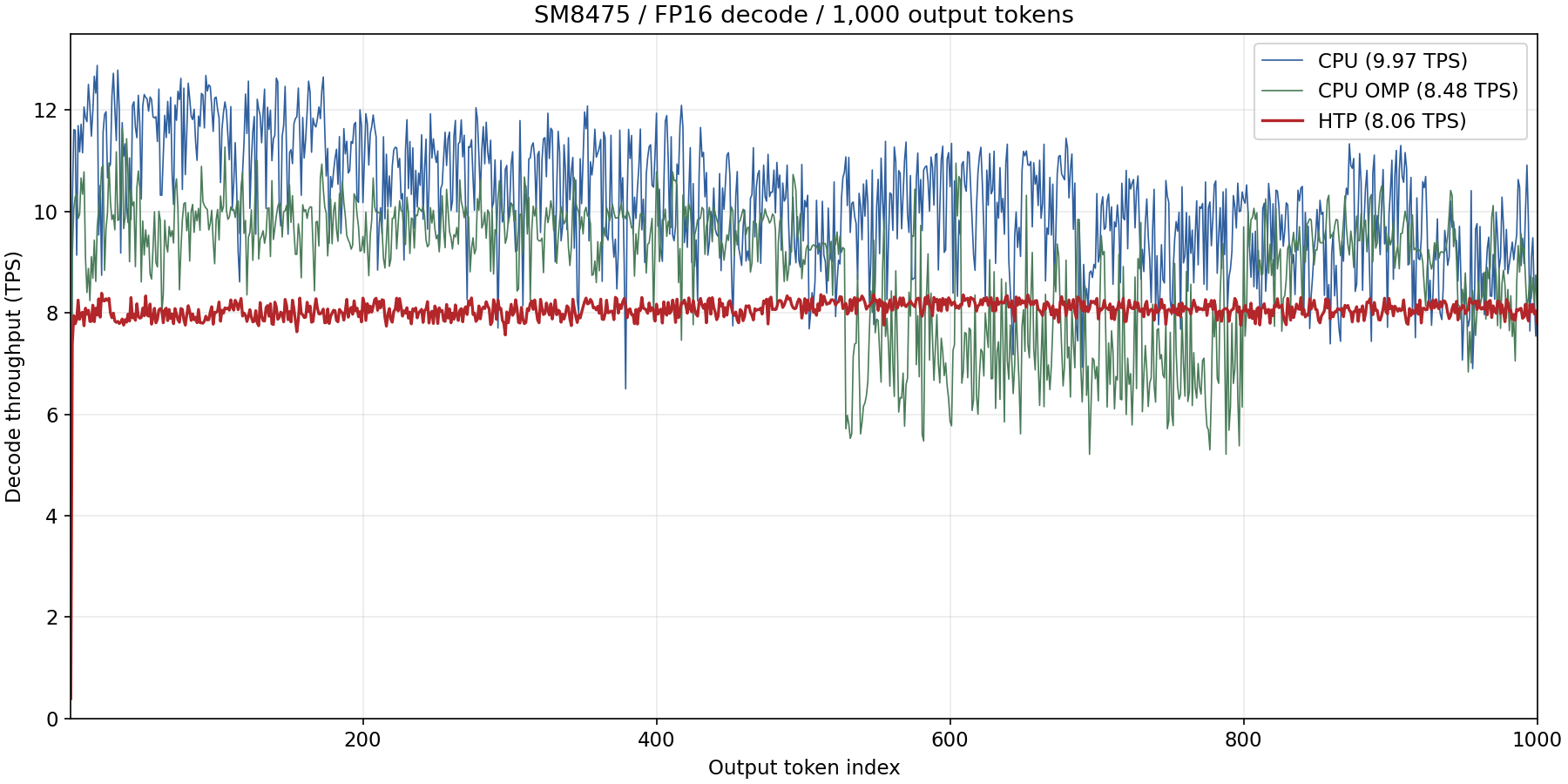
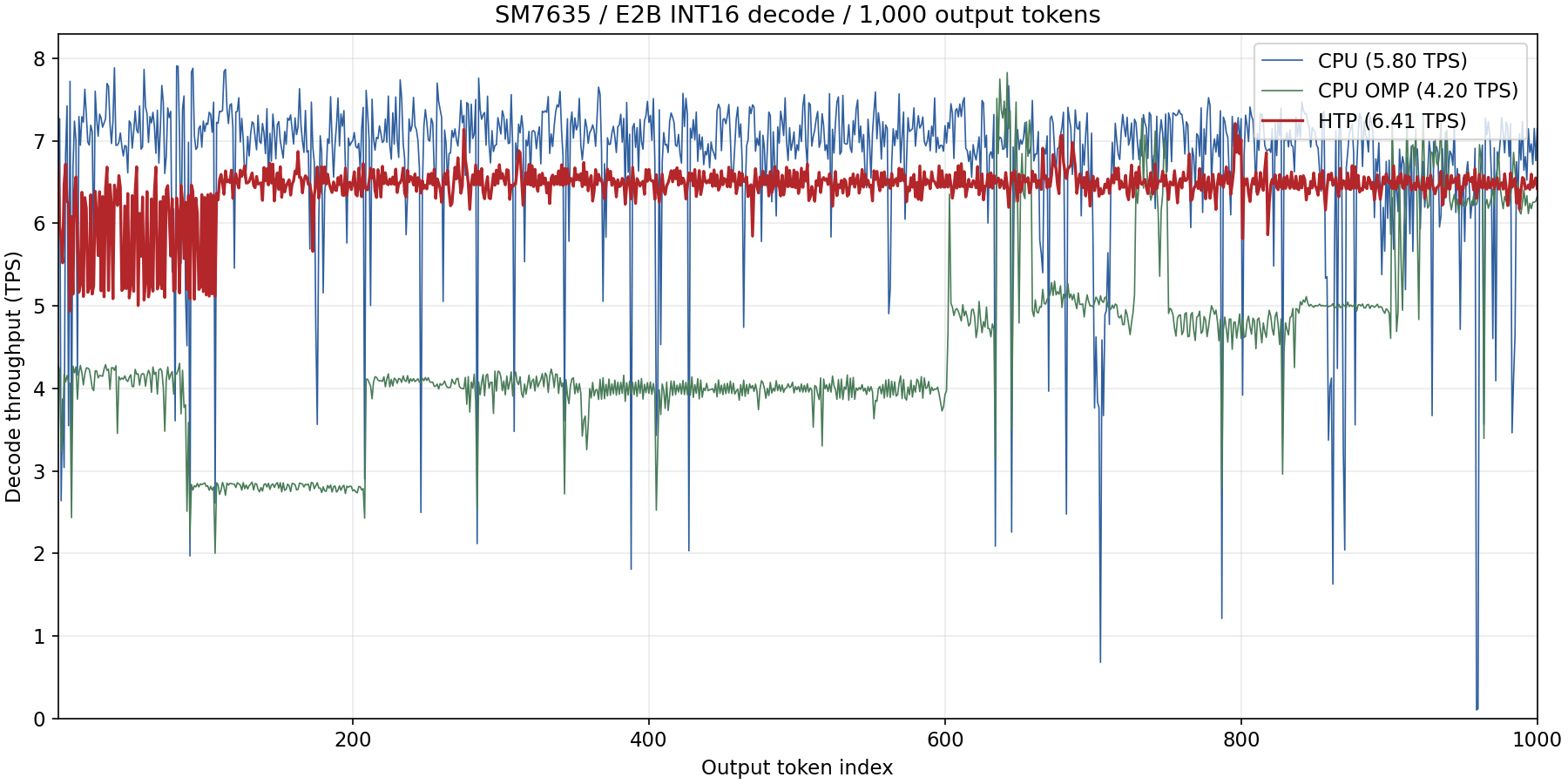
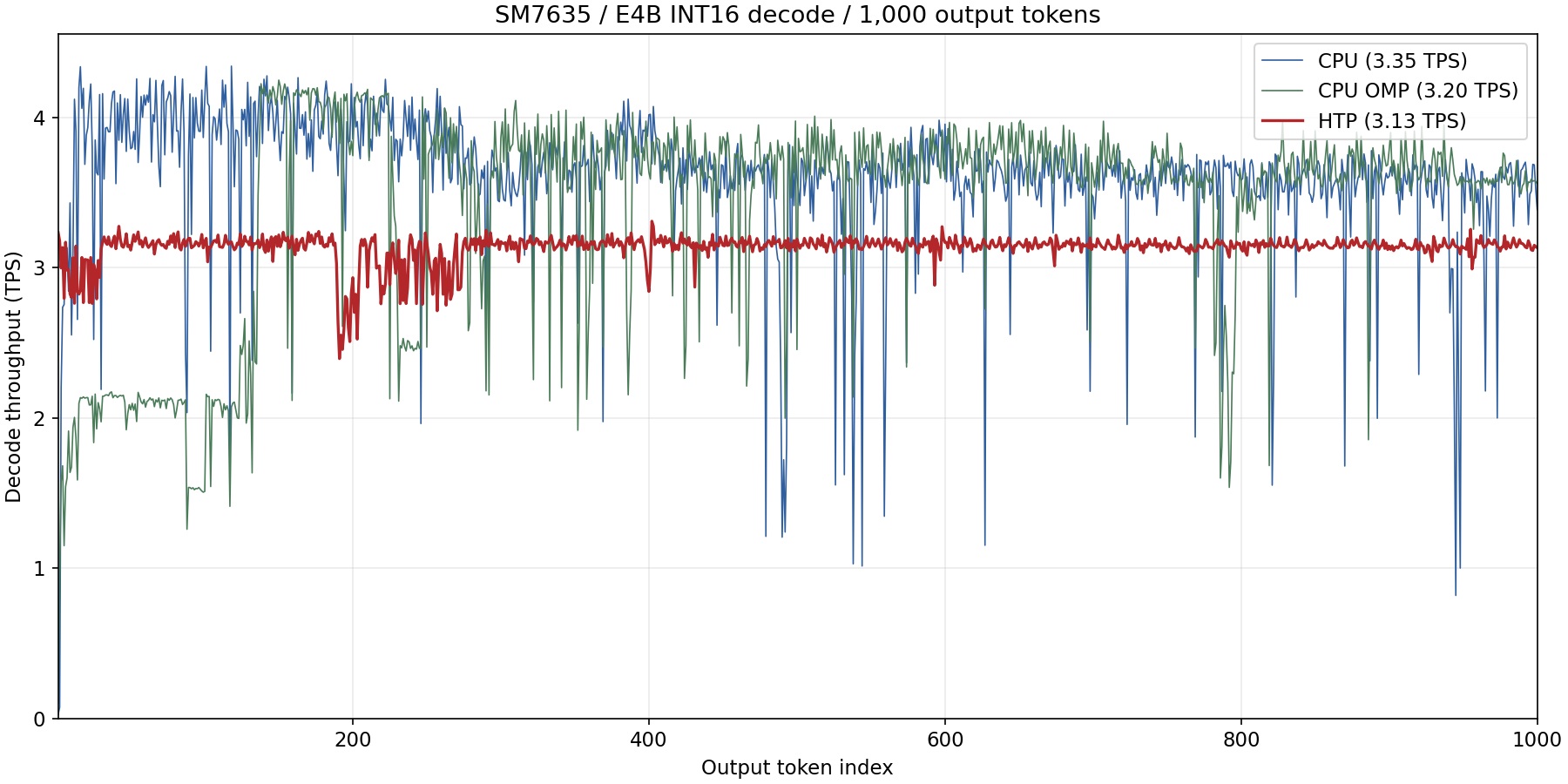
The following results were measured with Gemma 4 on two devices. Snapdragon 8+ Gen 1 (SM8475 / Hexagon v69) uses the E2B FP16 model, and Snapdragon 7s Gen 3 (SM7635 / Hexagon v73) uses the E2B and E4B Int16 models. All were measured with QAIRT 2.47, a context length of 8192 and the AR-256 / AR-1 configuration.
The CPU numbers run the same Q4_0 GGUF through the standard llama.cpp path on the same device (8 decoder workers, context 8192). The shipping configuration is the build with OpenMP disabled, which is the "CPU" column. "CPU (OpenMP)" is a comparison build made with GGML_OPENMP=ON and OMP_NUM_THREADS=2.
Throughput with 81 input tokens and 1,000 generated tokens.
| Device | Model | CPU | CPU (OpenMP) | NPU (QNN) | Effect of the NPU |
|---|---|---|---|---|---|
| SM8475 (Hexagon v69) | E2B / FP16 | 9.971 tokens/s | 8.482 tokens/s | 8.062 tokens/s | 0.81x |
| SM7635 (Hexagon v73) | E2B / Int16 | 5.805 tokens/s | 4.195 tokens/s | 6.410 tokens/s | 1.10x faster |
| SM7635 (Hexagon v73) | E4B / Int16 | 3.351 tokens/s | 3.203 tokens/s | 3.128 tokens/s | 0.93x |
With E2B on SM7635, NPU decode is 1.10x faster than the CPU (1.53x faster than the OpenMP build). On the other hand, E2B on SM8475 (0.81x) and E4B on SM7635 (0.93x) are slower than the CPU. Decode processes one token at a time, so it is dominated by weight loading and does not benefit much from the parallel compute of the NPU.
Throughput (tokens/s) for input lengths from 64 to 2,048 tokens. After a two-token warmup, SetPrompt is called twice without evaluation to clear the KV cache, and exactly one token is generated at each input length.
| Device / model / path | 64 | 128 | 256 | 512 | 1024 | 2048 |
|---|---|---|---|---|---|---|
| SM8475 E2B CPU | 109.359 | 95.722 | 88.243 | 85.663 | 79.940 | 71.244 |
| SM8475 E2B CPU (OpenMP) | 54.184 | 55.333 | 61.476 | 60.319 | 55.500 | 51.064 |
| SM8475 E2B NPU (FP16) | 76.244 | 144.406 | 277.775 | 302.667 | 301.791 | 299.827 |
| SM7635 E2B CPU | 91.550 | 77.064 | 80.496 | 76.187 | 69.757 | 59.192 |
| SM7635 E2B CPU (OpenMP) | 27.441 | 49.999 | 62.793 | 70.965 | 69.228 | 56.059 |
| SM7635 E2B NPU (Int16) | 33.601 | 66.523 | 130.329 | 133.404 | 131.367 | 130.252 |
| SM7635 E4B CPU | 1.697 | 29.105 | 28.417 | 62.663 | 64.383 | 60.897 |
| SM7635 E4B CPU (OpenMP) | 6.746 | 27.824 | 40.097 | 61.877 | 66.980 | 54.372 |
| SM7635 E4B NPU (Int16) | 20.304 | 40.890 | 80.700 | 83.758 | 83.314 | 78.258 |
actual input tokens / time of the first generate call.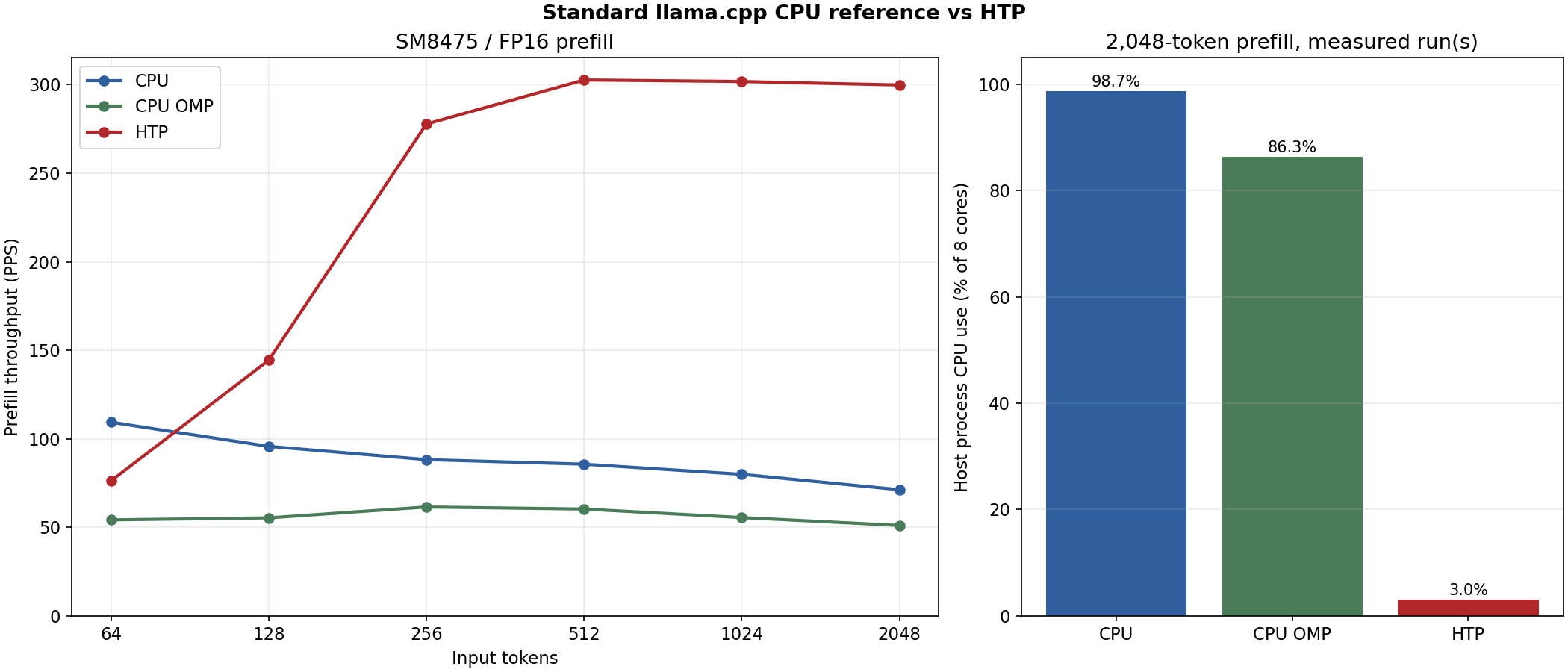
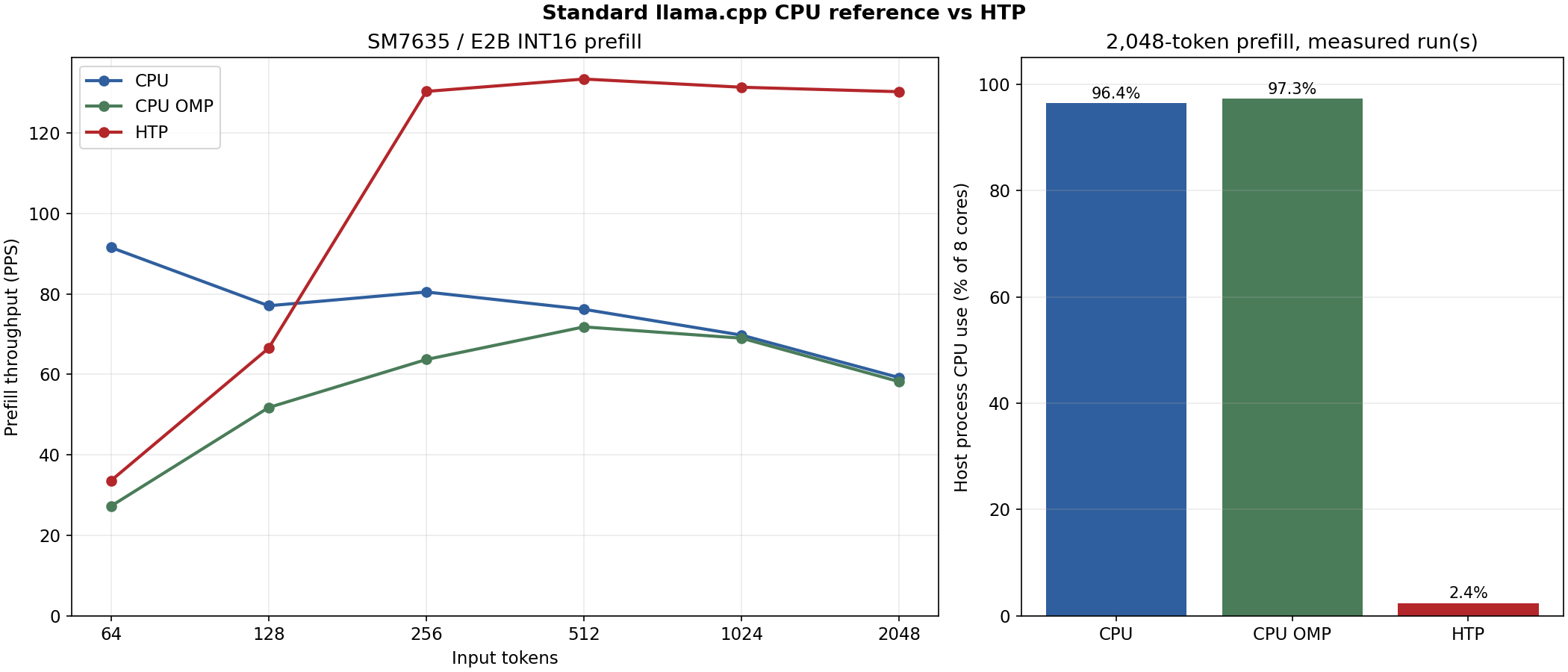
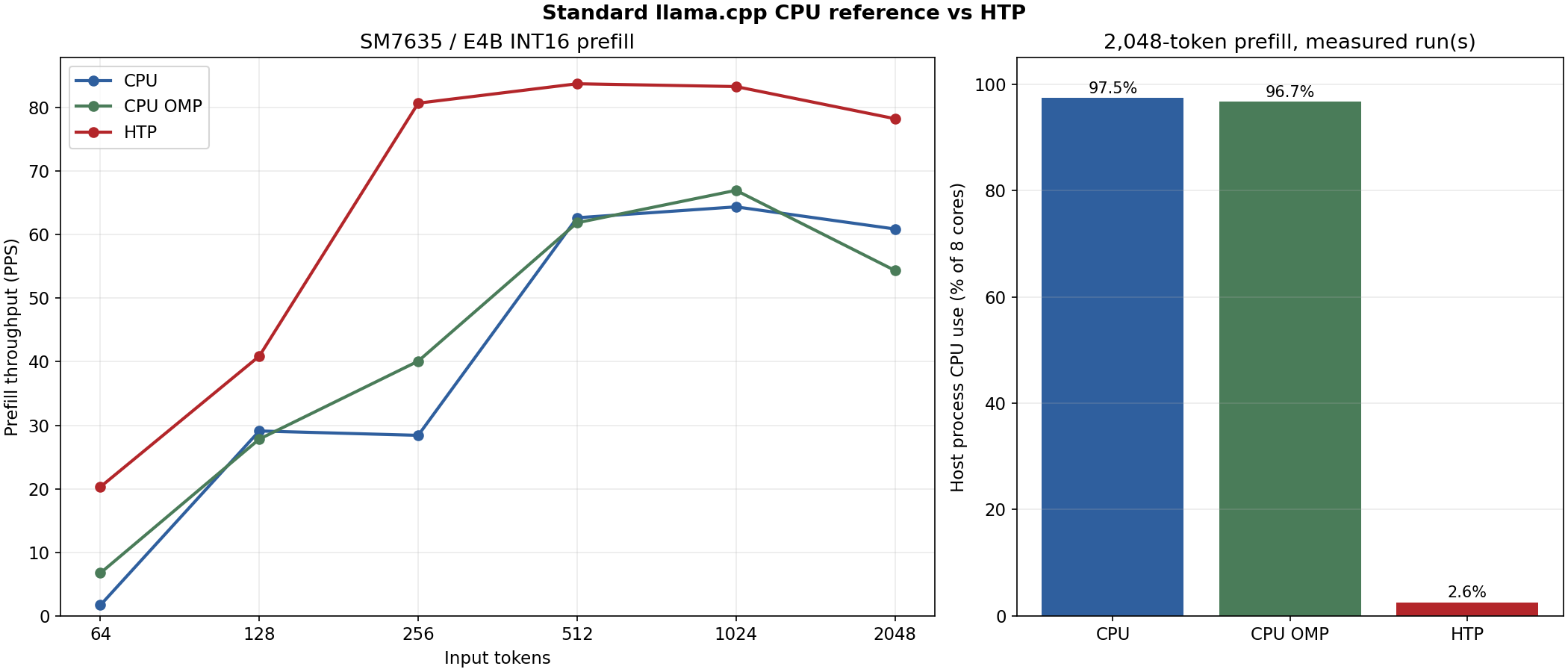
Process CPU time measured around the first generate call of a 2,048-token prefill, expressed as a share of all 8 cores fully occupied (8 cores = 100%). This is the utilization of the application process, not of the whole device.
| Device / model | CPU | CPU (OpenMP) | NPU (QNN) |
|---|---|---|---|
| SM8475 E2B | 98.7% | 86.3% | 3.0% |
| SM7635 E2B | 96.4% | 97.3% | 2.4% |
| SM7635 E4B | 97.5% | 96.7% | 2.6% |
On the NPU, CPU use during prefill stays around 3%, leaving the CPU available for the rest of the application. Running on the CPU occupies nearly all 8 cores, which raises heat and interferes with other work.
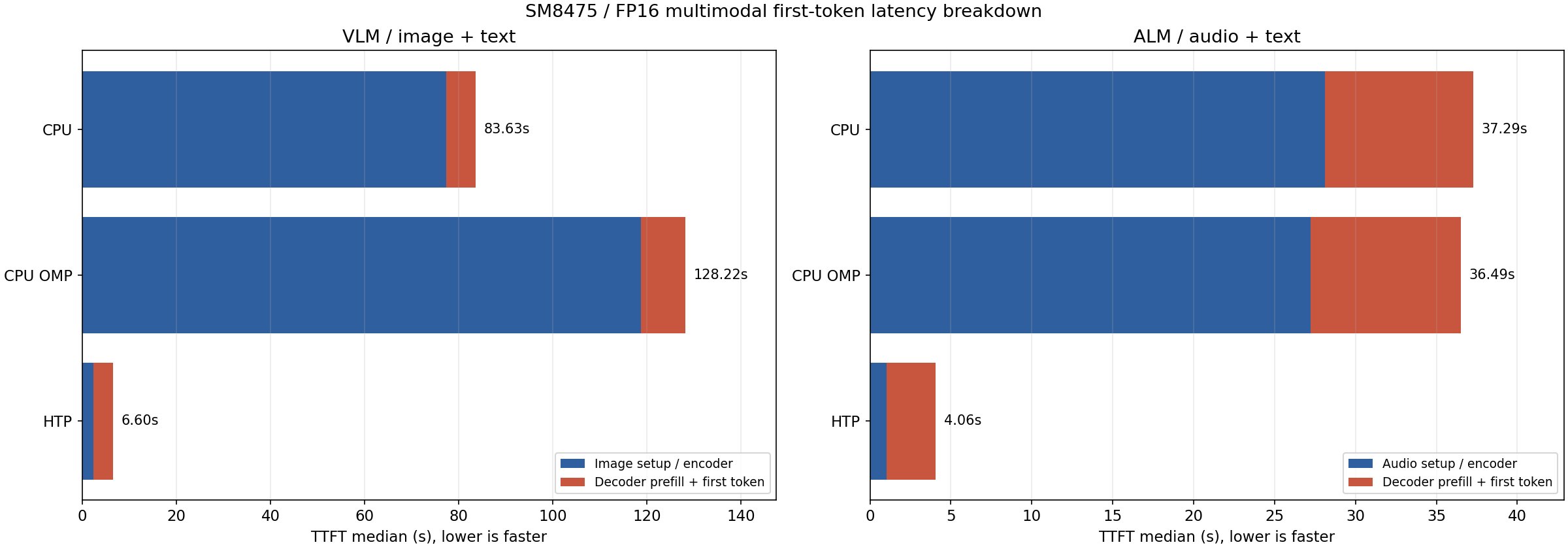
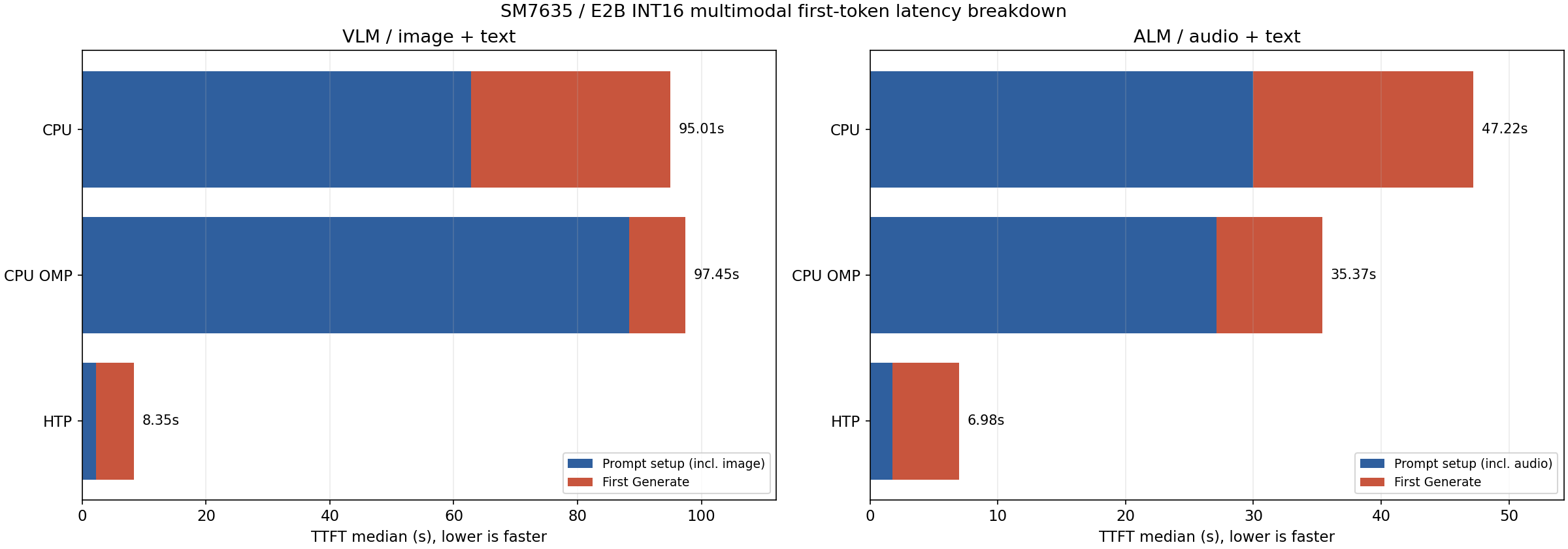
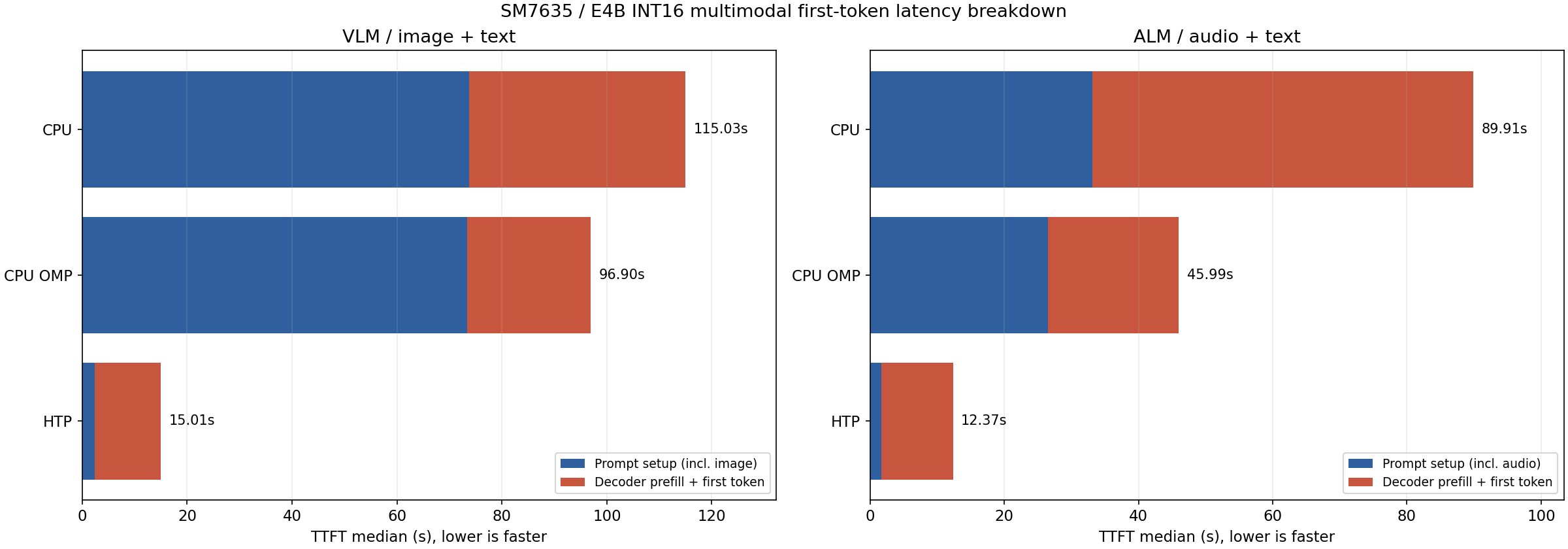
Medians over the same 10 images at 768x768 with 100 output tokens each. TTFT is the prompt setup including the image encoder plus the first generate call, excluding model opening.
| Device / model / path | TTFT (median) | Decode (median) |
|---|---|---|
| SM8475 E2B CPU | 83.63 s | 12.081 tokens/s |
| SM8475 E2B CPU (OpenMP) | 128.22 s | 7.491 tokens/s |
| SM8475 E2B NPU (FP16) | 6.60 s | 7.033 tokens/s |
| SM7635 E2B CPU | 95.01 s | 5.891 tokens/s |
| SM7635 E2B CPU (OpenMP) | 97.45 s | 3.569 tokens/s |
| SM7635 E2B NPU (Int16) | 8.35 s | 6.444 tokens/s |
| SM7635 E4B CPU | 115.03 s | 3.332 tokens/s |
| SM7635 E4B CPU (OpenMP) | 96.90 s | 2.642 tokens/s |
| SM7635 E4B NPU (Int16) | 15.01 s | 3.098 tokens/s |
Image TTFT is about 12.7x faster for E2B on SM8475, about 11.4x faster for E2B on SM7635 and about 7.7x faster for E4B. Both the CPU and the NPU consume the same 768x768 pixels and the same 256 image embeddings.
Medians over 10 FLEURS recordings (2 each in 5 languages, generated to natural EOS with a 256-token cap). TTFT is the prompt setup including the audio encoder plus the first generate call, excluding model opening.
| Device / model / path | TTFT (median) | Decode (median) | Output tokens |
|---|---|---|---|
| SM8475 E2B CPU | 37.29 s | 10.416 tokens/s | 21-89 |
| SM8475 E2B CPU (OpenMP) | 36.49 s | 10.539 tokens/s | 21-89 |
| SM8475 E2B NPU (FP16) | 4.06 s | 6.495 tokens/s | 21-90 |
| SM7635 E2B CPU | 47.22 s | 5.166 tokens/s | 21-89 |
| SM7635 E2B CPU (OpenMP) | 35.37 s | 3.846 tokens/s | 21-89 |
| SM7635 E2B NPU (Int16) | 6.98 s | 6.356 tokens/s | 22-60 |
| SM7635 E4B CPU | 89.91 s | 3.053 tokens/s | 21-91 |
| SM7635 E4B CPU (OpenMP) | 45.99 s | 2.947 tokens/s | 21-91 |
| SM7635 E4B NPU (Int16) | 12.37 s | 3.018 tokens/s | 21-91 |
Audio TTFT is about 9.2x faster for E2B on SM8475, about 6.8x faster for E2B on SM7635 and about 7.3x faster for E4B.
E2B: memory usage on SM7635 (Hexagon v73) while running the LLM, VLM and ALM configurations with 8 generated tokens (in MiB, context length 8192). The CPU path uses the Q4_0 GGUF with the BF16 mmproj, and the NPU path uses the Int16 QNN Model. Models are loaded with mmap, so anonymous memory (RssAnon, the working memory actually allocated) and file-backed mappings (RssFile, reusable page cache) are listed separately. Peak is the peak resident size of the process (VmHWM).
| Model | Workload | Path | VmHWM | RssAnon | RssFile |
|---|---|---|---|---|---|
| E2B | LLM | CPU | 4574.2 | 1524.1 | 2896.5 |
| E2B | LLM | NPU (Int16) | 1666.8 | 386.4 | 1276.2 |
| E2B | VLM | CPU | 4881.2 | 2512.4 | 40.3 |
| E2B | VLM | NPU (Int16) | 2161.2 | 673.3 | 1483.7 |
| E2B | ALM | CPU | 4873.7 | 2623.0 | 1509.1 |
| E2B | ALM | NPU (Int16) | 2202.5 | 591.6 | 1606.7 |
mallopt(M_PURGE, 0) brings it down to about 23 MiB.E4B was measured on the same device as a single LLM run per path with 81 input tokens and 100 output tokens (in MiB). The RssAnon / RssFile split was not captured, so live PSS is listed instead. These conditions differ from the E2B table.
| Model | Workload | Path | VmHWM | Live PSS |
|---|---|---|---|---|
| E4B | LLM | CPU | 5569.8 | 4432.7 |
| E4B | LLM | CPU (OpenMP) | 5518.2 | 3922.2 |
| E4B | LLM | NPU (Int16) | 1976.0 | 1801.8 |
With E4B as well, the NPU peak is about a third of the CPU path. This measurement was taken with the device at Thermal Status 1 and is affected by Android page reclamation.